OPM-1S · Page stacker and feedback eliminator
The increased sophistication of today's intercom and paging systems requires products that are easily integrated into a wide variety of applications.
The OPM-1S is designed for use in high traffic public address systems. This unit offers 4 minutes of audio storage with excellent audio clarity. This unit is able to stack and play up to 16 announcements, while recording new announcements at the same time.
Overview
Key features
- Stack and play up to 16 pages
- Record new pages while previous pages are playing back
- 4 minute total recording time
- Frequency response up to 6.8 kHz
- Repeat page mode
- Delay between pages
- Dry Loop / Loop Start modes
- Line level and 8 Ω output modes
- Priority bypass input
- DTMF tone stripping
- DTMF inhibitor function
- Industrial grade all metal construction
- Wall mounted format; optional rack mount kit
- Power pack included
Applications
- Airports with multiple zone requirements: DTMF commands are captured from the page and passed to the zone controller
- Industrial facilities with paging feedback problems: recording, then playing the message eliminates feedback
- Retail locations with a busy paging system: record while play, and multiple units, give efficiency and more inputs to the paging system
Specifications
| Audio | |
|---|---|
| Output | Adjustable dual output, 8 Ω / 600 Ω |
| Audio coding | 16 bit PCM, mono |
| Bandwidth | 100 Hz – 6.8 kHz |
| Signal to noise | 60 dB |
| Dynamic range | 60 dB |
| Distortion (THD) | < 1% |
| Audio inputs | Page and priority inputs, RJ12, 600 Ω, transformer isolated; Dry Loop (−10 dB) or Loop Start (900 Ω, 24 VDC talk battery) |
| Messages and storage | |
| Storage | 4 minutes (16 announcements) |
| Page stacking | Stacks and plays up to 16 announcements while recording new ones |
| Recording | Started by loop current, audio sensor, DTMF tone or contact closure; up to 1 minute per page |
| Message repeats | Once or twice |
| Delay between messages | 1, 3, 5 or 10 seconds |
| Control | |
| Manual controls | Record, play, stop, priority, abort |
| DTMF control | Tone stripping, allotment of 2, 3, 4 or unlimited tones, “##” abort |
| Modes | Automatic or manual playback; optional pre-page tone |
| Relays | In use, playing and recording contacts |
| Indicators | Power, priority and audio in loop current, audio sense, busy, play, record LEDs |
| Physical | |
| Mounting | Wall-mountable chassis |
| Dimensions | 10″ W × 1.5″ H × 6.75″ D |
| Power | 12 VDC, 1 A power pack (included); 2.5 mm barrel, center positive |
| Weight | 2.6 lb |
| Rating | FCC Part 15, Class A; UL/CSA power pack |
| Warranty | 1 year |
User manual in brief
Installation
The OPM-1S is typically installed between the telephone system, or paging microphone console, and the paging amplifier(s). In a zone paging system it feeds the paging (zone) controller; in a single-zone installation it feeds the amplifier directly.
- Mount the unit on a wall, in a rack or on a table with the supplied screws, with its wiring at least 18″ away from the power supply and from other equipment that generates electrical noise. A rack mount kit (OPM-RM-KIT) is optional.
- Plug the supplied 12 VDC, 1 A power pack into a standard outlet that is not controlled by a switch.
- Connect the PBX or audio source and the paging system, set the DIP switches, then connect power; the Power LED lights green. Test the unit.
Connections
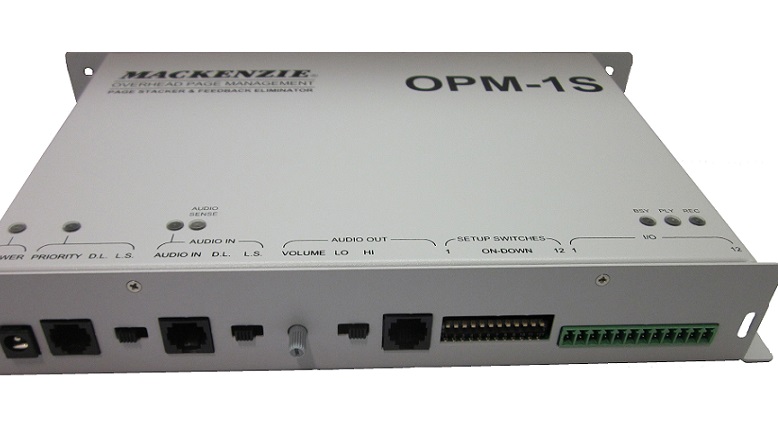
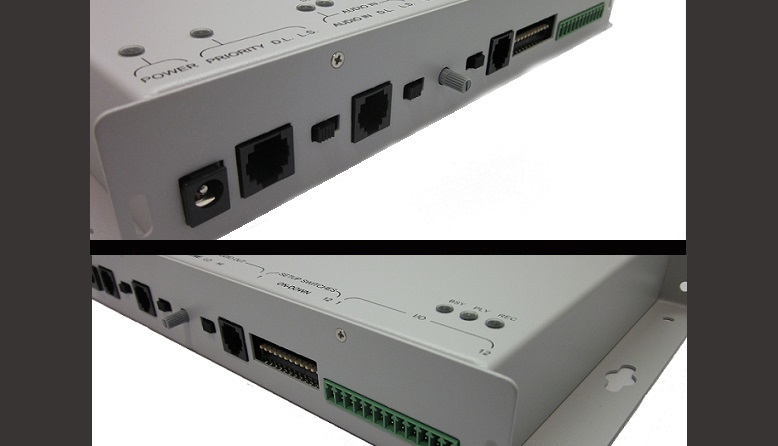
- Power: 12 VDC at 1 A, 2.5 mm barrel, center positive; internal self-resetting fuse. The chassis is connected to the negative side of the supply.
- PRIORITY (RJ12, 6 position, 600 Ω, transformer isolated): pin 2 priority input (connect to ground, pin 5, to activate); pin 3 audio ring; pin 4 audio tip; pin 5 ground (power return, connected to the chassis); pins 1 and 6 not used.
- AUDIO IN (RJ12, 6 position, 600 Ω, transformer isolated): pin 2 record input (connect to ground, pin 5, to activate); pin 3 audio ring; pin 4 audio tip; pin 5 ground; pins 1 and 6 not used.
- AUDIO OUT (RJ12, 6 position, transformer isolated): pin 2 playing contact, common; pin 3 audio output (−); pin 4 audio output (+); pin 5 playing contact, normally open (factory set; a normally closed option exists); pins 1 and 6 not used. Output +4 dB/600 Ω line level or 500 mW/8 Ω power level.
- I/O (12 position Euro-style pluggable terminal strip): 1 common for all control functions; 2 ABORT, cancels any activity; 3 PRIORITY, paralleled on the PRIORITY RJ12; 4 STOP, stops the current recording or playback; 5 PLAY, manual playback; 6 RECORD, paralleled on the AUDIO IN RJ12; 7–8 IN USE relay (normally open, common); 9–10 PLAYING relay (normally open, common); 11–12 RECORDING relay (normally open, common).
Controls and indicators
- PRIORITY and AUDIO IN mode switches: DRY LOOP (left) sets the input for 600 Ω line level (−10 dB nominal); LOOP START (right) sets 900 Ω and supplies 24 VDC talk battery, for loop start trunk ports.
- VOLUME: the output level delivered to the paging system, shipped set to 1:1 gain.
- LO/HI switch: left for power level (500 mW/8 Ω), right for line level (+4 dB/600 Ω).
- LEDs: Power (green, unit on); Priority and Audio In (yellow, loop start current flowing); Audio Sense (green, audio present on the input); Busy (yellow, recording, playing, delaying or making a priority announcement); Play (green, playing a page); Record (red, recording a page).
Setup switches
A 12 position DIP switch, up is OFF and down is ON. The settings are read at power up, so power must be cycled for a change to take effect.
- 1–2, record activation: off hook, loop current (1 OFF, 2 OFF, default); audio sensor (1 OFF, 2 ON); DTMF (1 ON, 2 OFF).
- 3, DTMF tone stripping: active (default) or not active. Zone control tones at the start of a page are stripped from its repeat, since the zone controller is already routed; tones in the middle of a page play normally.
- 4, stripping method: strip only the tones at the start of a page (default), or strip tones anywhere in the page and restart the recording, deleting everything recorded before them.
- 5–6, DTMF allotment: unlimited (default), 4, 3 or 2 tones. A page with more tones than allowed is aborted.
- 7, “##” abort: enabled (default) or inhibited. Pressing # twice within one second aborts the page being recorded and sends a busy back tone; a single # has no effect.
- 8, play mode: automatic (default) or manual.
- 9, pre-page tone: disabled (default) or enabled. The alert tone plays before each page in the queue, not before repeats.
- 10, number of plays: once (default) or twice.
- 11–12, delay between plays: 1 second (default), 3, 5 or 10 seconds, between pages and between repeats.
Recording pages
The OPM-1S eliminates feedback by recording each page and then playing it back, opening the loop between microphone and speakers; it can repeat each page for better intelligibility in a noisy environment, and it stacks up to 16 pages, recording new pages while playing earlier ones on a first in, first out basis. DTMF tones can be recorded and regenerated, or blocked, for zone controller applications.
- Loop start, 2 wire: the OPM-1S sources 24 VDC talk battery to ring and tip and records for as long as loop current flows (phone off hook). Switches 1–2 on off hook, mode switch on Loop Start, a loop start trunk port or compatible 900 Ω input with ring on pin 3 and tip on pin 4 of AUDIO IN.
- Audio sensor: recording starts when audio is detected and stops after 3 seconds without audio. Mode switch on Dry Loop, source audio on pins 3 and 4.
- DTMF: recording starts on a valid DTMF tone and stops after 3 seconds without audio, for activation without a switch closure on noisy lines. Mode switch on Dry Loop.
- Dry loop, 4 wire: a maintained contact closure on the record input (AUDIO IN pins 2 and 5, or I/O pins 1 and 6) records for the duration of the closure, whatever the switch settings.
Playback and priority
- Automatic playback (switch 8 OFF, factory default): each page plays as soon as its recording is complete; the most used mode for paging, with minimal installation.
- Manual playback (switch 8 ON): a momentary closure between I/O pins 1 and 5 plays the pages, for full control of when they play. The output device (speaker, amplifier or zone controller) connects to pins 3 and 4 of AUDIO OUT.
- Priority: activation by loop start, dry loop or the priority input gives immediate access to the public address system and halts playback of recorded pages; when the priority page ends, the OPM-1S resumes from the beginning of the interrupted page.
Limits and troubleshooting
- Page aborted with a busy back tone → it was longer than 1 minute, the maximum per page.
- Page not played → it was shorter than 1 second, or it held 3 seconds or more of silence (deleted, with a busy back tone).
- Busy back tone when starting a page → memory is full (16 pages or 4 minutes); a page cut off at the end of memory is not played. Wait for queued pages to play.
- Recording aborted during DTMF entry → the DTMF allotment (switches 5–6) was exceeded, or # was pressed twice.
- Changed setup switches have no effect → cycle power; the switches are read at power up.
Documents
| Document | Content | Format |
|---|---|---|
| Spec sheet | Specifications | |
| Operation guide | User manual | |
| Quikey: connectivity detail | Connectivity detail |
Images
Related models: Page management
| OPM-1S | Page stacker and feedback eliminator | This page |
|---|---|---|
| OPM-3SM | Multiple-channel page stacker, feedback eliminator and messaging system |